Friday, June 26, 2020

Hours , Mins and Seconds from Total Seconds

How to find out Hours , Mins and Seconds from Total Seconds from Oracle DB?

Query:

WITH seconds_to_time AS (
    SELECT
        8222 total_seconds
    FROM
        dual
)
SELECT
    total_seconds,
    round(total_seconds / 3600, 0) hours,
    mod(round(total_seconds / 60, 0), 60) mins,
    mod(total_seconds, 60) seconds,
    round(total_seconds / 3600, 0)
    || ':'
    || mod(round(total_seconds / 60, 0), 60)
    || ':'
    || mod(total_seconds, 60) time
FROM
    seconds_to_time

Friday, May 8, 2020

Example on populating Employee Hierarchy

Scenario:
Employee Hierarchy (here max Hierarchy is consider to be 4) need to be populated as mentioned below:
Source:

Output:

Prerequisite:
create tables structure for temporary table.


PL/SQL code:

begin EXECUTE IMMEDIATE 'truncate table emp_hierarchy';
EXECUTE IMMEDIATE 'truncate table emp_hi';
FOR i IN (
    SELECT
        employee_id
    FROM
        hr.employees
    ORDER BY
        employee_id
)
loop
    EXECUTE IMMEDIATE 'drop table employees';
    EXECUTE IMMEDIATE 'create table employees as select * from hr.employees where employee_id=' || i.employee_id;
    EXECUTE IMMEDIATE 'truncate table emp_hi';
    INSERT INTO emp_hi
        WITH cte (
            employee_id,
            first_name,
            manager_id,
            pos
        ) AS (
            SELECT
                employee_id,
                first_name,
                manager_id,
                1 pos
            FROM
                employees
            UNION ALL
            SELECT
                cte.employee_id,
                mgr.first_name,
                mgr.manager_id,
                cte.pos + 1 pos
            FROM
                hr.employees mgr,
                cte
            WHERE
                mgr.employee_id = cte.manager_id
        )
        SELECT
            employee_id,
            first_name,
            5 - pos pos
        FROM
            cte;

    COMMIT;
    INSERT INTO emp_hierarchy
        SELECT
            employee_id,
            mgr_level4,
            coalesce(mgr_level3, mgr_level4) mgr_level3,
            coalesce(mgr_level2, mgr_level3, mgr_level4) mgr_level2,
            coalesce(mgr_level1, mgr_level2, mgr_level3, mgr_level4) mgr_level1
        FROM
            emp_hi PIVOT (
                MAX ( first_name )
                FOR pos
                IN ( 4 mgr_level4, 3 mgr_level3, 2 mgr_level2, 1 mgr_level1 )
            );
    commit;
    end loop;
END;


Output:

Saturday, August 10, 2019

Interview Question - Optimization Context

Q:what is the Optimization Context used for?
Ans: ODI uses the Optimization Context to validate your Mapping at design time.
This means it will validate your filters,functions etc. against the environment setup in your Optimization Context.

How to use Select query inside ODI 12c mapping?


Scenario:
Need to populate employee hierarchy for that technical team provided the SQL. I have to build ODI mapping for that. I decided to use SQL as it is.

Steps:
1.       Drag and Drop Target datastore twice on to the Mapping editor
2.       Select first datastore and change the alias name as “SQ”
3.       Select Second datastore and change the alias name as “TRG”

4.       Go to Physical
5.       Select “SQ” and go to property inspector and expand “Extract Options” à Go to “Custom Template” and in place value provide your SQL


6.       Connect SQ output connector to TRG input connector
7.       Enable auto map
8.       Run the mapping it load the data to Target table

Thursday, April 18, 2019

Scripts - Range & Exchange Partition

Scripts:

/* Partition Table - If it is already exists then Drop the table*/
DROP TABLE RANGE_PARTITION;

/* Create range partition per fiscal year */
CREATE TABLE RANGE_PARTITION
(ROW_WID NUMBER,
MONTH_WID DATE)
PARTITION BY RANGE(MONTH_WID)
(PARTITION P_2015 VALUES LESS THAN(TO_DATE('01-06-2016','DD-MM-YYYY')),
PARTITION P_2016 VALUES LESS THAN(TO_DATE('01-06-2017','DD-MM-YYYY')),
PARTITION P_2017 VALUES LESS THAN(TO_DATE('01-06-2018','DD-MM-YYYY')),
PARTITION P_2018 VALUES LESS THAN(TO_DATE('01-06-2019','DD-MM-YYYY')),
PARTITION P_2019 VALUES LESS THAN(TO_DATE('01-06-2020','DD-MM-YYYY')),
PARTITION P_2020 VALUES LESS THAN(TO_DATE('01-06-2021','DD-MM-YYYY')),
PARTITION P_MAX VALUES LESS THAN(maxvalue));

/* Inserting records for all the partitions */
INSERT INTO RANGE_PARTITION
SELECT LEVEL ROW_WID,
TO_DATE('31-05-2015','DD-MM-YYYY')+LEVEL MONTH_WID
FROM DUAL
CONNECT BY LEVEL < = TO_DATE('31-05-2020','DD-MM-YYYY')-TO_DATE('31-05-2015','DD-MM-YYYY');


/* Retrieving partitioning records for the fiscal year 2019 */
SELECT *
FROM RANGE_PARTITION PARTITION(P_2019);


/* Truncating the Partition*/
ALTER TABLE RANGE_PARTITION TRUNCATE PARTITION P_2019;

/* Retrieving partitioning records for the fiscal year 2019 */
SELECT *
FROM RANGE_PARTITION PARTITION(P_2019);

/* Dropping table*/
DROP TABLE PARTITION_EXCHANGE;

/* Create a new table which hold all the records related to partition 2019 fiscal year*/
CREATE TABLE PARTITION_EXCHANGE
AS
SELECT LEVEL ROW_WID,
TO_DATE('31-05-2019','DD-MM-YYYY')+LEVEL MONTH_WID
FROM DUAL
CONNECT BY LEVEL < = TO_DATE('31-05-2020','DD-MM-YYYY')-TO_DATE('31-05-2019','DD-MM-YYYY');

/* Cross Check -  all records are populated as per my partition */
SELECT MIN(MONTH_WID) , MAX(MONTH_WID) FROM PARTITION_EXCHANGE;

/* Exchange Partition with table*/
ALTER TABLE RANGE_PARTITION EXCHANGE PARTITION P_2019 WITH TABLE PARTITION_EXCHANGE;

/* After exchange partition */
SELECT * FROM PARTITION_EXCHANGE;

/* Retrieving partitioning records for the fiscal year 2019 */
SELECT *
FROM RANGE_PARTITION PARTITION(P_2019);

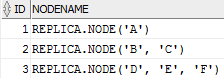
Example on Flatten Component - ODI 12c

To process input data with complex structure and produces the flattened representation of the same data using standard datatypes

Scenario:
Input Data:

Output Data:

Scripts:

CREATE OR REPLACE TYPE node AS TABLE OF VARCHAR2(30);
/
CREATE TABLE nested_table (id NUMBER, NodeName node)
       NESTED TABLE NodeName STORE AS NodeName_tab;
/
INSERT INTO nested_table VALUES (1, node('A'));
INSERT INTO nested_table VALUES (2, node('B', 'C'));
INSERT INTO nested_table VALUES (3, node('D', 'E', 'F'));
COMMIT;
/
SELECT * FROM nested_table;


ODI Steps:
-------------

1. Create Mapping
2. Drag and drop source data store (NESTED_TABLE) from source model.
3. Drag and drop flatten component from component palette into mapping editor
4. Drag and drop Target data store (CONVERTED_NESTED_TABLE) from target Model
5. Connect output connector of flatten component to input connector of Target data Store
6. Connect output connector of Source data store to input connector of flatten Component as mentioned below
7. Map ID column from source data store to Flatten component directly
8. Map Node Column as mentioned below


9. Select complex attribute type as mentioned below on flatten component


10. Execute it

Output:

Saturday, February 16, 2019

How to bypass procedure the step in ODI 11g?

Scenario:
Based on the option value I need to execute that step or skip that step.

Example:
IKM whenever we select create target table true then only target table will be created. Similar functionality even we can provide to procedure as well.

Process:


  1. Create an option for an procedure
  2. Disable always execute option as mentioned below:

and select SKIPSTEP option
      3. Option value is True. So that I will skip that step