Showing posts sorted by relevance for query lookup. Sort by date Show all posts

Friday, December 28, 2018

Lookup components - Advantages

Scenario 1:
If the lookup value is not available (no match row) then I need to populate default value without any expression.

For example:
Stage fact table is having "department_id" where as in Dimension table is not have that specific "department_id". In that case we need to populate 0 for "deparment_wid".

Scenario 2:
For one lookup code we are having multiple lookup values but we have to pick only one value without using distinct , aggregate and analytical functions

For example:
If lookup table is versioned table (i.e., one lookup code will have multiple values one is current and rest are old values)

Scenario 1:

Employee table is having department_id : 10
Whereas department table is not having deparment_id : 10


Scenario 2:
In department table for department_id : 90 we are having two records but only one is active record
(we can understand based on effective date)

Output - Fact Table
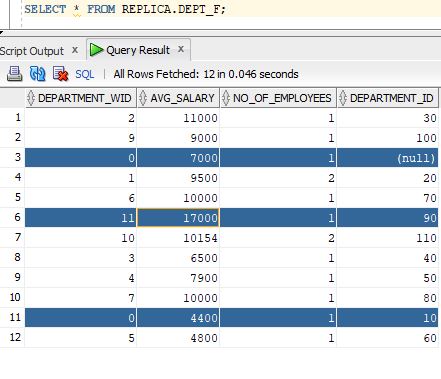

Whose department_id is not exists in department table for those department_wid is populated as 0
for rest those are populated from dimension table (row_wid column) as below


If you observe we are having multiple values for department_id : 90 but we picked only row_wid in the fact_table i.e., 11 (single value picked)

Approach:


In the lookup component, we can see match row rules

Multiple Match rows: (scenario 2) Select first single row (i.e., eff_dt desc - row_wid: 11)
Return a row with the following default values: (scenario 1) row_wid:0 (i.e., whenever there is no match then it will populate with 0)

Please comment out if you have any questions!!!!!!!!

Wednesday, September 13, 2017

ODI Components

Datasets:
 Datasets provide a
logical container in which you can organize sources, and define joins and filters on
them through an entity-relationship mechanism, rather than the flow mechanism
used elsewhere in mappings. Datasets operate similarly to ODI 11g interfaces, and
if you import 11g interfaces into ODI 12c, ODI will automatically create datasets
based on your interface logic. Datasets act as selector components.

Lookup: - (selector)
A Lookup is a selector component  that returns data from a lookup flow being given a value from a driving flow. The
attributes of both flows are combined, similarly to a join component. A lookup can be
implemented in generated code either through a Left Outer Join or a nested Select
statement.
Lookups can be located in a dataset or directly in a mapping as a flow component.
When used in a dataset, a Lookup is connected to two datastores or reusable mappings
combining the data of the datastores using the selected join type

Reusable Mappings
Reusable mappings are modular, encapsulated flows of components which you
can save and re-use.

Filter:
Filters can be located in a dataset or directly in a mapping as a flow component.

Expression - selector
An expression is a selector component  that
inherits attributes from a preceding component in the flow and adds additional
reusable attributes.

Join: (selector)
A Join is a selector component that creates
a join between multiple flows. A Join can be located in a dataset or directly in a mapping as a flow component. A join
combines data from two or more components, datastores, datasets, or reusable
mappings.

Aggregate - projector
The aggregate component is a projector component  which groups and combines attributes using aggregate functions, such as
average, count, maximum, sum, and so on. ODI will automatically select attributes
without aggregation functions to be used as group-by attributes. You can override this
by using the Is Group By and Manual Group By Clause properties.

Sort:- projector
A Sort is a projector component that will
apply a sort order to the rows of the processed dataset, using the SQL ORDER BY
statement.

Distinct - projector
A distinct is a projector component  that
projects a subset of attributes in the flow. The values of each row have to be unique;
the behavior follows the rules of the SQL DISTINCT clause.

Spilt - (selector)
A Split is a selector component  that divides
a flow into two or more flows based on specified conditions. Split conditions are not
necessarily mutually exclusive: a source row is evaluated against all split conditions
and may be valid for multiple output flows.

Monday, May 12, 2014

LookUp Concept in ODI 11g

Scenario:
We need to populate manager for an employee using ODI.
In employees table we will have manager id and we need to look that id again with employee table to get name of the manager.

Approach:
1.Creating an interface
2.Creating lookup in an interface

Pre-requisites:
1.You need to know how to create the logical and physical schema.
2.You should aware of the creating project
3.You should aware of how to create file datastore and employee datastore as well.

Execution:
1.Creating an interface
    (a.)Expand the project folder
               go to the First Folder and expand it
                    right click on the interface
                          Create new interface
     (b.)Drag and drop the Employee datastore from model to the source side of an interface
     (c.)Drag and drop the Employee_Manager_list datastore (file datastore) from model to the target side of an interface.
 2.Click on
            Then it will show some pop up for us

Expand your model where your employee datastore available and click next.
Select Manager Id and Employee Id and click on the Join Button .
Lookup condition you observe as follows
EMPLOYEES.MANAGER_ID=EMPLOYEES1.EMPLOYEE_ID
and click finish.

Finally interface looks as follows:


Output:

Post your comments and your questions if you have any.

Wednesday, October 14, 2020

SQL Interview questions

Scenario's:

1. I have an employee table 4 of them are male candidates and 4 of them are female candidates. I need result in such a way that alternatively I have to show male and female employees

Employee Table:


Expected Result:


Query:
SELECT NAME,GENDER FROM (
SELECT
    NAME,GENDER,DECODE(GENDER,'MALE',1,0) ORD_VAL,ROW_NUMBER() OVER (PARTITION BY GENDER ORDER BY NAME) RNK
FROM
    employee) ORDER BY RNK,DECODE(GENDER,'MALE',1,0);

Output:


2. I have Table A (Driving Table) and Table B (Lookup table).I have to pick all the values from Table-A

but if I came across any duplicates when I join with Table-B then I have to pick only one value from Table-B.

For Example:

Table A(Employee):


Table B(Department):


Expected Result:


Query:

select name,department_name from (

select e.name,d.name department_name,row_number() over (partition by rn order by d.name) rn from

(select name,department_id,rownum rn from employee) e left outer join department d on e.department_id = d.department_id)

where rn=1

Output:


Wednesday, October 8, 2014

Declarative Design


Conventional ETL
Consider, for example, a common case in which sales figures must be summed over time for different customer age groups. The sales data comes from a sales management database, and age groups are described in an age distribution file. In order to combine these sources and then insert and update appropriate records in the customer statistics systems, you must design each step, which includes
1. Load the customer sales data in the engine
2. Load the age distribution file in the engine
3. Perform a lookup between the customer sales data and the age distribution data
4. Aggregate the customer sales grouped by age distribution
5. Load the target sales statistics data into the engine
6. Determine what needs to be inserted or updated by comparing aggregated information with the data from the statistics system
7. Insert new records into the target
8. Update existing records into the target

Conventional ELT
With declarative design, you just need to design what the process does, without describing how it will be done.
In our example, what the process does is
• Relate the customer age from the sales application to the age groups from the statistical file

• Aggregate customer sales by age groups to load sales statistics