Tuesday, September 8, 2020

Tip 4: Physical Mapping Design cannot be modified even if the Logical Design of the Mapping is changed

Q: You want to ensure that the Physical Mapping Design cannot be modified even if the Logical Design of the Mapping is changed. What sequence of steps must you follow to achieve this

Ans:

  1. Go to Mapping Editor
  2. Go to the Physical tab
  3. select the Is Frozen check box of the Physical Mapping Design


Tip 3: Model that works with multiple underlying technologies

 Q: You need to create a Model that works with multiple underlying technologies. How must you proceed?

Ans: Create a new generic technology to support it.

Monday, August 31, 2020

How to specify Loading Order in ODI 12c?

 From ODI 12c onwards we can load multiple tables with single mapping. In that case we need to make sure that which table need to be load first and next. For that we need to specify order.

  1. Open Mapping
  2. Go to Property Inspector as mentioned below:


How to specify Join Order in ODI 12c Mappings?

 In ODI, we have option of specify join order. 

  1. Select Join Component
  2. Go to property Inspector and specify as mentioned below:


Join Order need to enable and specify your order next to User Defined.

JSON to Table using ODI 12c

JSON to Table using ODI 12c:

Scripts

Source:

[

                {

                                "id": "0001",

                                "type": "donut",

                                "name": "Cake",

                                "ppu": 0.55,

                                "batters":

                                                {

                                                                "batter":

                                                                                [

                                                                                                { "id": "1001", "type": "Regular" },

                                                                                                { "id": "1002", "type": "Chocolate" },

                                                                                                { "id": "1003", "type": "Blueberry" },

                                                                                                { "id": "1004", "type": "Devil's Food" }

                                                                                ]

                                                },

                                "topping":

                                                [

                                                                { "id": "5001", "type": "None" },

                                                                { "id": "5002", "type": "Glazed" },

                                                                { "id": "5005", "type": "Sugar" },

                                                                { "id": "5007", "type": "Powdered Sugar" },

                                                                { "id": "5006", "type": "Chocolate with Sprinkles" },

                                                                { "id": "5003", "type": "Chocolate" },

                                                                { "id": "5004", "type": "Maple" }

                                                ]

                },

                {

                                "id": "0002",

                                "type": "donut",

                                "name": "Raised",

                                "ppu": 0.55,

                                "batters":

                                                {

                                                                "batter":

                                                                                [

                                                                                                { "id": "1001", "type": "Regular" }

                                                                                ]

                                                },

                                "topping":

                                                [

                                                                { "id": "5001", "type": "None" },

                                                                { "id": "5002", "type": "Glazed" },

                                                                { "id": "5005", "type": "Sugar" },

                                                                { "id": "5003", "type": "Chocolate" },

                                                                { "id": "5004", "type": "Maple" }

                                                ]

                },

                {

                                "id": "0003",

                                "type": "donut",

                                "name": "Old Fashioned",

                                "ppu": 0.55,

                                "batters":

                                                {

                                                                "batter":

                                                                                [

                                                                                                { "id": "1001", "type": "Regular" },

                                                                                                { "id": "1002", "type": "Chocolate" }

                                                                                ]

                                                },

                                "topping":

                                                [

                                                                { "id": "5001", "type": "None" },

                                                                { "id": "5002", "type": "Glazed" },

                                                                { "id": "5003", "type": "Chocolate" },

                                                                { "id": "5004", "type": "Maple" }

                                                ]

                }

]


Target DDL:


CREATE TABLE "DEMO"."JSON_TABLE"

   (           "FILE_NAME" VARCHAR2(255 BYTE),

                "LOAD_DATE" VARCHAR2(255 BYTE),

                "ID" NUMBER(10,0),

                "NAME" VARCHAR2(255 BYTE),

                "PPU" NUMBER(10,2),

                "TYPE" VARCHAR2(255 BYTE),

                "SEQ_NUM" NUMBER(10,0),

                "BATTER_ID" NUMBER(10,0),

                "BATTER_TYPE" VARCHAR2(255 BYTE),

                "TOPPING_ID" NUMBER(10,0),

                "SEQ_TOPPING" NUMBER(10,0),

                "TOPPING_TYPE" VARCHAR2(255 BYTE)

   )


Topology Configuration:

Create new Data Server under "ComplexFile" Technology as mentioned above
Go to JDBC Tab, specify 
          Select JDBC Driver and
          JDBC URL as mentioned above

[Note: If you don't have XSD handy please click on Edit nXSD and proceed to generate XSD]

Provide the properties as mentioned above:
  1. DTD : XSD file location we need to provide here
  2. File : Actual file location we need to provide here
  3. root_elt : root_element of your XSD
  4. schema : Specify schema name or file name of the XSD

Create Data Server as mentioned below:


Create Physical Schema as mentioned below: 
Please specify your own schema name.


Create Logical Schema as mentioned below:

Go to Designer Navigator and 
Create Model as specified below:


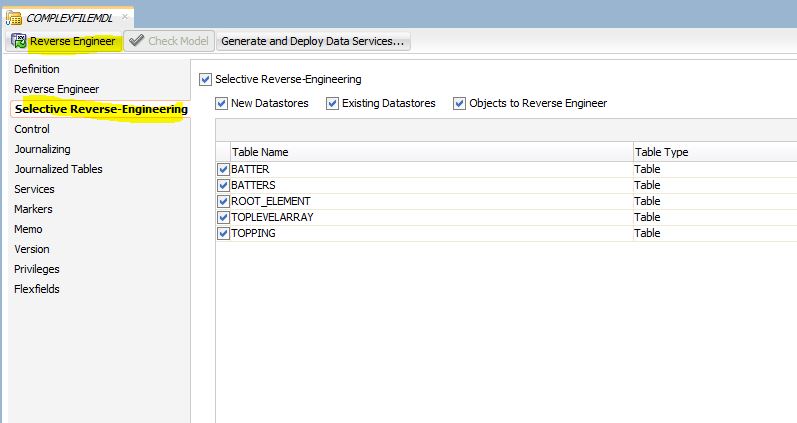
Go to Selective Reverse-Engineering tab and select as mentioned below and click on Reverse Engineering

Reverse Engineer the target data store into corresponding model.

Go to Project Accordion under designer navigator
Create Project
Create Mapping as mentioned below:


Select Join and specify Execution on Hint as "Stage" for all the joins as mentioned below:


Run the mapping

Output:


Friday, July 17, 2020

Collection Types in PL/SQL

/*Scripts to practice or test it*/

DROP TABLE DEMO.STUDENT_MARKS;
CREATE TABLE DEMO.STUDENT_MARKS(SNO NUMBER,SUBJECT VARCHAR2(10),MARKS NUMBER);
/
INSERT INTO DEMO.STUDENT_MARKS VALUES(1,'MATHS',100);
INSERT INTO DEMO.STUDENT_MARKS VALUES(1,'SCIENCE',100);
INSERT INTO DEMO.STUDENT_MARKS VALUES(1,'SOCIAL',99);
INSERT INTO DEMO.STUDENT_MARKS VALUES(2,'MATHS',97);
INSERT INTO DEMO.STUDENT_MARKS VALUES(2,'SCIENCE',89);
INSERT INTO DEMO.STUDENT_MARKS VALUES(2,'SOCIAL',79);
INSERT INTO DEMO.STUDENT_MARKS VALUES(3,'MATHS',99);
INSERT INTO DEMO.STUDENT_MARKS VALUES(3,'SCIENCE',96);
INSERT INTO DEMO.STUDENT_MARKS VALUES(3,'SOCIAL',94);

SELECT * FROM DEMO.STUDENT_MARKS;


/* Record Type using Type */
DECLARE
TYPE STUDENT_REC IS RECORD (SNO DEMO.STUDENT_MARKS.SNO%TYPE,SUBJECT DEMO.STUDENT_MARKS.SUBJECT%TYPE, MARKS DEMO.STUDENT_MARKS.MARKS%TYPE);
STUDENT STUDENT_REC;
BEGIN
    SELECT SNO,SUBJECT,MARKS INTO STUDENT FROM DEMO.STUDENT_MARKS WHERE SUBJECT='SOCIAL' AND MARKS>95;
    DBMS_OUTPUT.PUT_LINE(STUDENT.SNO||' '||STUDENT.SUBJECT||' '||STUDENT.MARKS);
END;


/* Record Type using ROWTYPE */
DECLARE
STUDENT DEMO.STUDENT_MARKS%ROWTYPE;
BEGIN
    SELECT SNO,SUBJECT,MARKS INTO STUDENT FROM DEMO.STUDENT_MARKS WHERE SUBJECT='SOCIAL' AND MARKS>95;
    DBMS_OUTPUT.PUT_LINE(STUDENT.SNO||' '||STUDENT.SUBJECT||' '||STUDENT.MARKS);
END;


/*Collections:
============
1.Varray */


DECLARE
TYPE MY_VARRAY IS VARRAY(9) OF DEMO.STUDENT_MARKS.SNO%TYPE;
STUDENT MY_VARRAY;
BEGIN
    SELECT DISTINCT SNO BULK COLLECT INTO STUDENT FROM DEMO.STUDENT_MARKS;
    for i in 1..STUDENT.COUNT
    LOOP
        DBMS_OUTPUT.PUT_LINE(STUDENT(i));
    END LOOP;
END;


/*2.a. Nested Table with single dimension */
DECLARE
TYPE MY_NESTED_TABLE IS TABLE OF DEMO.STUDENT_MARKS.SNO%TYPE;
STUDENT MY_NESTED_TABLE;
BEGIN
    SELECT DISTINCT SNO BULK COLLECT INTO STUDENT FROM DEMO.STUDENT_MARKS;
    for i in 1..STUDENT.COUNT
    LOOP
        DBMS_OUTPUT.PUT_LINE(STUDENT(i));
    END LOOP;
END;


/*2.b. Nested table with 2D*/

DECLARE
TYPE STUDENT_REC IS RECORD (SNO DEMO.STUDENT_MARKS.SNO%TYPE,SUBJECT DEMO.STUDENT_MARKS.SUBJECT%TYPE,MARKS DEMO.STUDENT_MARKS.MARKS%TYPE);
TYPE MY_NESTED_TABLE IS TABLE OF STUDENT_REC;
STUDENT MY_NESTED_TABLE;
BEGIN
    SELECT SNO,SUBJECT,MARKS BULK COLLECT INTO STUDENT FROM DEMO.STUDENT_MARKS;
    FOR i in 1..STUDENT.COUNT
    LOOP
        DBMS_OUTPUT.PUT_LINE(STUDENT(i).sno||' '||STUDENT(i).SUBJECT||' '||STUDENT(i).MARKS);
    END LOOP;
END;


/*3 Associate Array*/

DECLARE
TYPE MY_ASS_ARRAY IS TABLE OF DEMO.STUDENT_MARKS.MARKS%TYPE INDEX BY VARCHAR2(10);
STUDENT MY_ASS_ARRAY;
BEGIN

        STUDENT('Maths') := 97;
        STUDENT('Science') := 89;
        STUDENT('Social') := 79;
        DBMS_OUTPUT.PUT_LINE('Maths Marks:'||STUDENT('Maths')||' Science Marks:'||STUDENT('Science')||' Social Marks:'||STUDENT('Social'));
END;


Friday, June 26, 2020

Hours , Mins and Seconds from Total Seconds

How to find out Hours , Mins and Seconds from Total Seconds from Oracle DB?

Query:

WITH seconds_to_time AS (
    SELECT
        8222 total_seconds
    FROM
        dual
)
SELECT
    total_seconds,
    round(total_seconds / 3600, 0) hours,
    mod(round(total_seconds / 60, 0), 60) mins,
    mod(total_seconds, 60) seconds,
    round(total_seconds / 3600, 0)
    || ':'
    || mod(round(total_seconds / 60, 0), 60)
    || ':'
    || mod(total_seconds, 60) time
FROM
    seconds_to_time