Saturday, January 9, 2021

How to insert duplicate records into one table and non-duplicate records into another table using single DML operation (Oracle DB)?

 Input:


NONDUP_REC:

DUP_REC:

Query:

DUP_RECORDS_SPLIT Data:


INSERT FIRST 
WHEN RNK = 1 THEN 
    INTO NONDUP_REC VALUES (SID,SNAME,MARKS)
ELSE 
    INTO DUP_REC VALUES (SID,SNAME,MARKS)
SELECT * FROM
(SELECT SID,SNAME,MARKS, COUNT(SID) OVER (PARTITION BY SID ORDER BY SID) RNK FROM DUP_RECORDS_SPLIT);

COMMIT;


How to convert rows to columns in SQL (Oracle DB)?

 Input:

Expected Output:


Query:

UNPIVOT_TABLE Data:

SELECT * FROM 

    (SELECT * 

        FROM UNPIVOT_TABLE) 

        PIVOT (MAX(SALES) FOR QUARTER IN ('Q1' AS Q1,'Q2' AS Q2,'Q3' AS Q3,'Q4' AS Q4));

How to convert columns into rows in SQL (Oracle Database)?

 Input:


Expected Output:


Query:

PIVOT_TABLE Data:

SELECT * FROM 

    (SELECT * 

        FROM PIVOT_TABLE)

        UNPIVOT(SALES FOR QUARTER IN (Q1, Q2, Q3, Q4));    

Friday, December 4, 2020

SQL Interview Question - Product Company

Scenario 1:

Source Table:


Expected Result:


SQL Query: Consider source table as Sample

Using Pivot keyword:

Without using Pivot Keyword:


Scenario 2:

Source:


Expected Result:

SQL:


Here I am sharing one of the way. If someone come cross better solution you can share it in the comments it will be useful to everyone.

Wednesday, October 14, 2020

SQL Interview questions

Scenario's:

1. I have an employee table 4 of them are male candidates and 4 of them are female candidates. I need result in such a way that alternatively I have to show male and female employees

Employee Table:


Expected Result:


Query:
SELECT NAME,GENDER FROM (
SELECT
    NAME,GENDER,DECODE(GENDER,'MALE',1,0) ORD_VAL,ROW_NUMBER() OVER (PARTITION BY GENDER ORDER BY NAME) RNK
FROM
    employee) ORDER BY RNK,DECODE(GENDER,'MALE',1,0);

Output:


2. I have Table A (Driving Table) and Table B (Lookup table).I have to pick all the values from Table-A

but if I came across any duplicates when I join with Table-B then I have to pick only one value from Table-B.

For Example:

Table A(Employee):


Table B(Department):


Expected Result:


Query:

select name,department_name from (

select e.name,d.name department_name,row_number() over (partition by rn order by d.name) rn from

(select name,department_id,rownum rn from employee) e left outer join department d on e.department_id = d.department_id)

where rn=1

Output:


Tuesday, September 8, 2020

Debugger in ODI 12c

 Let me take a scenario:

I have implemented SCD 3 type in ODI 12c using Customized knowledge Module. Before using it I want to check it out whether is working as per requirement or not.

Source Data:


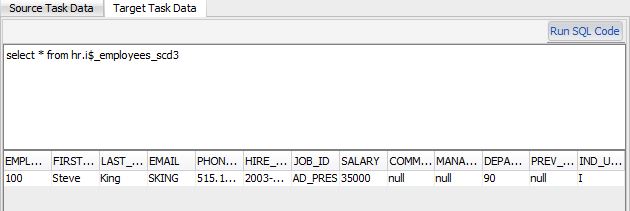
Target Data (After full load):


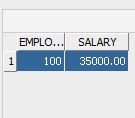
After update employee_id : 100 salary to 3500 Source Data:


Final Output:


Debugging Steps:

  1. Go to Mapping
  2. Open it
  3. Click on Debugger on top (which appears as mentioned below)

     4. Select debugging properties as mentioned below
       
       Select the context and Agent as per your mapping data load. Suspend Before First Task which will suspend immediate after the first task.
        Click Ok.

5. Debugging Mode display as mentioned below

6. Right click on step 50 and select the add break point
7. Click on Current Cursor as mentioned below

8. Then click on Resume button as mentioned below
9. Then right click on Step 50 and say get Data

10. Click on the Run Task End and right click on step 50 and say get Data


You can observe the staging table data immediately after that step.

11. Right click on Step 140 and add debugger and check whether that record is loading to target or not.
by following step 7, 8 and Step 10. Now check the data from ODI. as mentioned above .


Run from DB it is still not committed so u can't see that updated value yet.


Now I felt it good to go so I will edit break point by right click at step 140 and enable Suspend after executing the task as below:


Now click on Resume it.

Hence completed!!.. Now you can see the data reflected from DB also.


Tip 4: Physical Mapping Design cannot be modified even if the Logical Design of the Mapping is changed

Q: You want to ensure that the Physical Mapping Design cannot be modified even if the Logical Design of the Mapping is changed. What sequence of steps must you follow to achieve this

Ans:

  1. Go to Mapping Editor
  2. Go to the Physical tab
  3. select the Is Frozen check box of the Physical Mapping Design